HTTP/3 and QUIC: Demystifying the Shift from HTTP/2 and TCP Head-of-Line Blocking
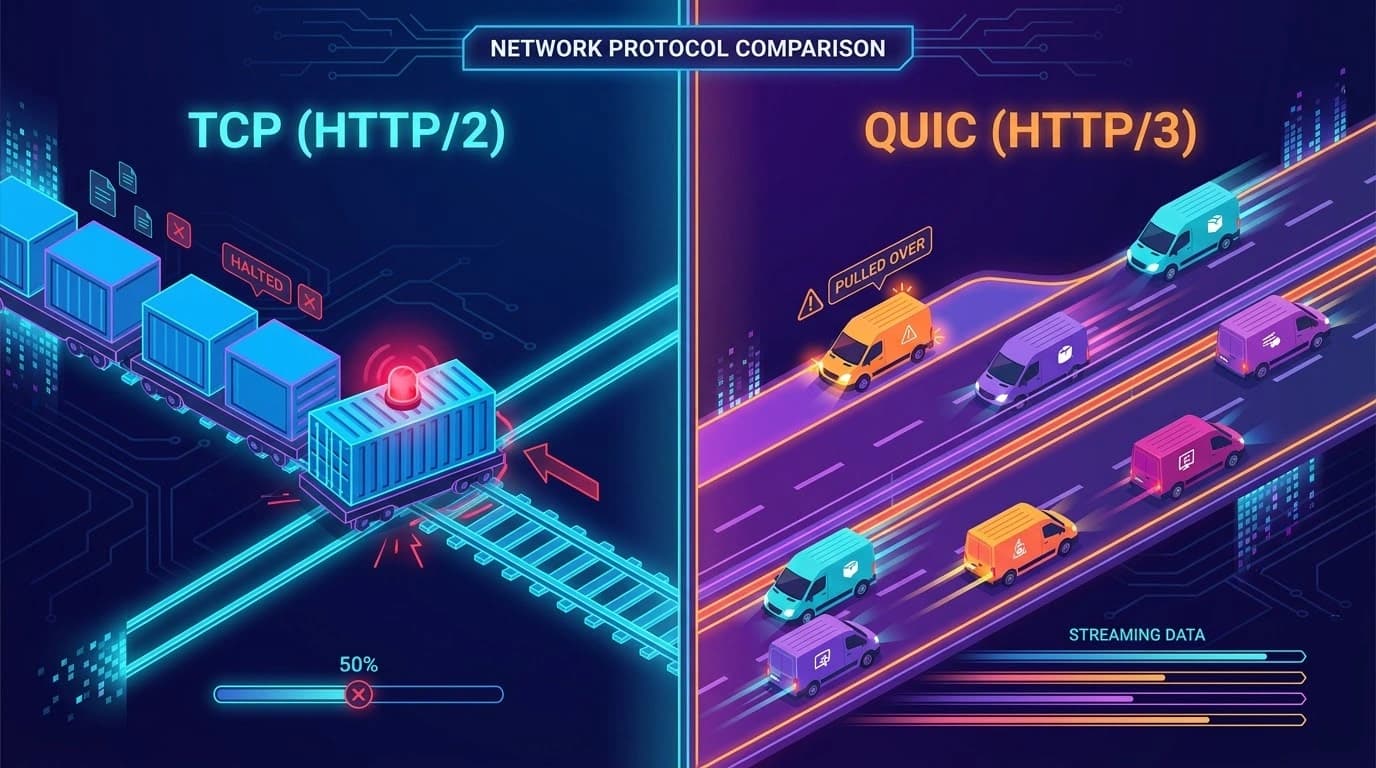
TL;DR: Head-of-Line (HOL) blocking happens when a single slow or lost packet of data delays everything behind it in a queue. While HTTP/2 solved application-level blocking, it still suffered from TCP-level blocking when packets dropped. HTTP/3 fixes this entirely by using QUIC and UDP, allowing independent streams of data to load instantly without waiting for each other.
Have you ever clicked on a link and watched your screen sit there blank, spinning endlessly, waiting for a single image or background to load? You probably blamed your Wi-Fi or your service provider. But what if I told you the problem was built deep inside the very foundation of the internet itself?
For decades, the protocols that power our web browsers have been playing a high-stakes game of telephone. Recently, I was watching an incredibly detailed video from Chai aur Code about HTTP/2's hidden limitations. It blew my mind how such a simple, structural bottleneck could freeze an entire web page's loading speed. Here is the history of HTTP and why the modern web is completely shifting toward HTTP/3 and the QUIC protocol.
What Is HTTP Head-of-Line Blocking?
HTTP Head-of-Line (HOL) blocking is a performance bottleneck where a single delayed or lost packet of data prevents all subsequent data from being processed by the browser.
To understand how we got here, we have to look at HTTP/1.1. In the HTTP/1.1 days, data transfer happened over a single TCP (Transmission Control Protocol) connection. It could only send one request and receive one response at a time.
The Drive-Thru Analogy
Imagine you are in a single-lane drive-thru at a burger joint:
- The first car orders a standard burger. It gets prepared, served, and they drive away.
- The second car orders 100 milkshakes.
- You are the third car, and you just want a single order of fries.
Because it's a single lane, you are completely stuck waiting for those 100 milkshakes to be blended. Even though your fries take 5 seconds to scoop, you cannot get your food until the car in front of you is fully served. This was exactly how application-layer Head-of-Line blocking bottlenecked early web performance.
Why It Matters
Head-of-Line blocking severely impacts user experience, especially on mobile networks. When you're sitting on a stable fiber-optic connection at home, you might not notice massive delays because packet loss is rare.
But the moment you step outside onto a spotty cellular network, or when you ride a train switching between towers, packet loss happens constantly. When a network chokes up and loses a packet, TCP pauses everything to recover it. This results in frozen screens, unresponsive apps, and frustrated users who abandon your site. Solving this bottleneck means delivering a lag-free, instant web experience regardless of network conditions.
How It Works: The Evolution from HTTP/1.1 to HTTP/3
To solve the blocking problem, the internet had to evolve. Here is how network engineers approached the bottleneck over the years.
HTTP/2 and the Multiplexing Fix
In 2015, HTTP/2 arrived to save the day by introducing Multiplexing. Instead of a rigid single pipe, HTTP/2 splits data into tiny pieces called frames, assigning them unique Stream IDs.
Think of this like a restaurant waiter with tagged plates . Instead of a drive-thru, you are sitting in a diner. The waiter doesn't wait to deliver Table 1's main course before bringing Table 2's appetizer. The kitchen cooks whatever is ready first, and every plate has a little flag (Stream ID). The browser can receive an image and CSS out of order without stalling!
The Hidden Trap: TCP-Level Blocking
While HTTP/2 fixed the application layer, it introduced a new problem at the transport layer. HTTP/2 still relied on TCP, which guarantees perfect, sequential order delivery.
Imagine your tagged plates are packed into a single cargo train . Cars 1-4 hold HTML, and Cars 5-8 hold an image. If Car 5 goes missing off the tracks, TCP forces the entire train to stop. Even if the CSS in Cars 9-12 is perfectly fine, the operating system holds everything hostage until Car 5 is recovered. This is Transport-Layer Head-of-Line blocking.
Enter HTTP/3 & QUIC: The UDP Solution
To fix TCP, engineers had to stop using TCP. HTTP/3 runs on QUIC (Quick UDP Internet Connections), which is built on top of UDP.
Instead of one giant train, HTTP/3 packs your data into a fleet of independent delivery vans . They drive down the highway independently. If Van 5 gets a flat tire, Vans 9-12 (carrying your CSS) don't care! They arrive and immediately style the page. Only the image in Van 5 is delayed, completely eliminating transport-level blocking.
| Feature | HTTP/1.1 | HTTP/2 | HTTP/3 | | :--- | :--- | :--- | :--- | | Transport Protocol | TCP | TCP | QUIC (over UDP) | | Multiplexing | No (Sequential) | Yes (Streams & Frames) | Yes (Streams & Frames) | | HOL Blocking Level | Application Layer | Transport Layer | None! | | Lost Packet Behavior | Connection stalls | Connection stalls | Only affected stream stalls |
Practical Steps to Optimize for HTTP/3
If you are a web developer or systems engineer, you can take advantage of HTTP/3 right now:
- Enable QUIC on your CDN: Most major CDNs like Cloudflare, Fastly, and AWS CloudFront offer one-click toggles to enable HTTP/3 edge routing.
- Configure Alt-Svc Headers: Ensure your server sends the
Alt-Svc(Alternative Service) HTTP header. This tells connecting browsers that a faster HTTP/3 route is available. - Audit Your Firewalls: Verify that your server’s firewall rules allow outbound and inbound UDP traffic on port 443.
Common Mistakes When Upgrading
When shifting to HTTP/3, developers often stumble on a few networking assumptions:
- Assuming TCP rules apply: QUIC handles congestion differently. Don't waste time trying to apply legacy TCP tuning parameters to a UDP-based protocol.
- Forgetting corporate firewalls: Some strict enterprise networks block UDP entirely to prevent DDoS attacks. Always ensure your server can gracefully fall back to HTTP/2 over TCP for these users.
FAQ
Q: What is the main difference between HTTP/2 and HTTP/3? A: HTTP/2 uses TCP, which suffers from transport-layer head-of-line blocking if packets drop. HTTP/3 uses QUIC over UDP, allowing independent data streams to load simultaneously even if one packet gets lost in transit.
Q: Does HTTP/3 require a new TLS certificate? A: No, HTTP/3 uses the same TLS certificates. However, QUIC has TLS 1.3 built directly into its transport layer, meaning encryption handshakes happen much faster than with standard TCP connections.
Q: Can firewalls block HTTP/3 traffic? A: Yes. Because HTTP/3 runs on UDP port 443 instead of TCP, some older corporate firewalls block it by default. If blocked, modern browsers will automatically fall back to using HTTP/2 over TCP.
Q: Is TCP head-of-line blocking really that bad? A: Yes, especially on unstable connections like mobile networks. A single dropped packet in a TCP connection forces the entire queue to halt until that packet is retransmitted, causing visible lag.
Q: How do I test if my website supports HTTP/3? A: You can use online tools like HTTP/3 Check or inspect the network tab in your browser's developer tools. Look for the "h3" protocol in the network requests column to confirm QUIC is active.
What's Next
The shift to HTTP/3 dramatically improves web performance. By replacing the strict sequential rules of TCP with QUIC and UDP, the internet now has a protocol built for the realities of modern mobile networks.